Excel Option Pricer
Excel based Black and Scholes calculator for European stock/index options and American options using dividend yields.
- Theoretical Price and Option Greeks support
- Implied Volatility Calculator
- Configurable Payoff Graphs
- Option Strategy Construction
- VBA used is unlocked and editable
Grab Your Free Copy
Enter your name and email and I'll send the workbook straight to your inbox.
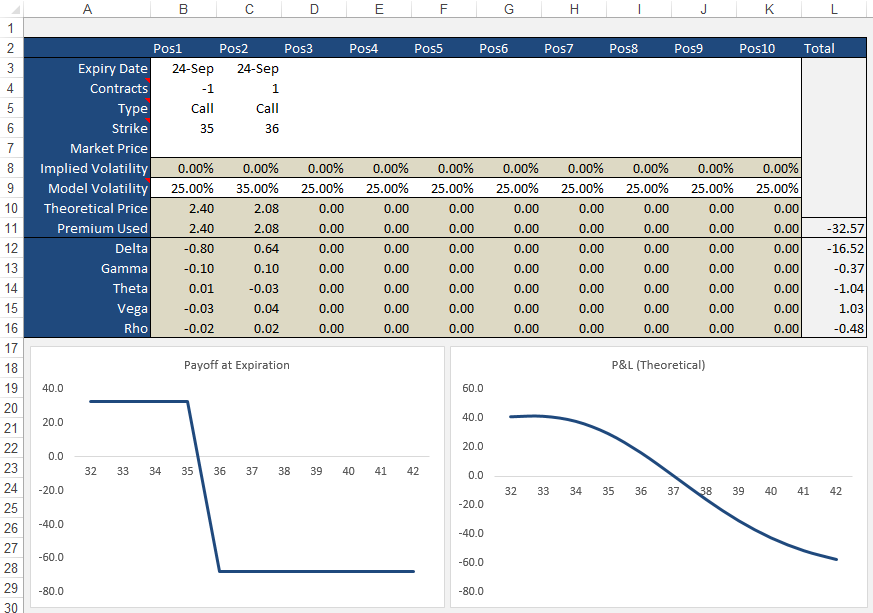
My option pricing spreadsheet will allow you to price European call and put options using the Black and Scholes model.
Understanding the behavior of option prices in relation to other variables such as underlying price, volatility, time to expiration etc is best done by simulation. When I was first learning about options I began building a spreadsheet to help me understand the payoff profiles of calls and puts and also what the profiles look like of different combinations. I've uploaded my workbook here and you're welcome to it.
Simplified
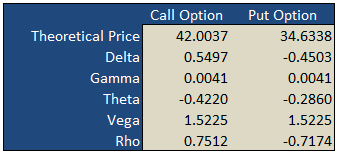
On the "basic" worksheet tab you will find a simple option calculator that generates fair values and option Greeks for a single call and put according to the underlying inputs you select. The white areas are for your user input while the shaded green areas are the model outputs.
Implied Volatility
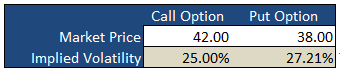
Underneath the main pricing outputs is a section for calculating the implied volatility for the same call and put option. Here, you enter the market prices for the options, either last paid or bid/ask into the white Market Price cell and the spreadsheet will calculate the volatility that the model would have used to generate a theoretical price that is in-line with the market price i.e. the "implied" volatility.
Payoff Graphs
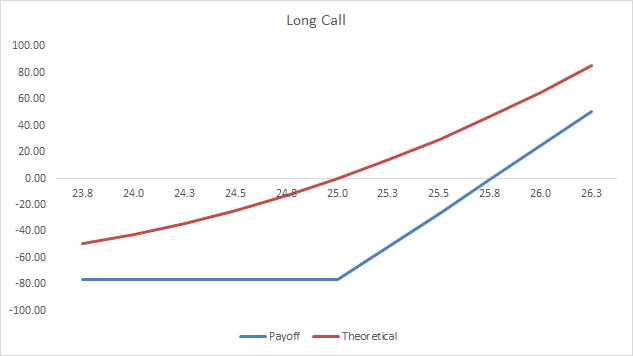
The PayoffGraphs tab gives you the profit and loss profile of basic option legs; buy call, sell call, buy put and sell put. You can change the underlying inputs to see how your changes effect the profit profile of each option.
Strategies
The Strategies tab allows you to create option/stock combinations of up to 10 components. Again, use the white areas for your user input while the shaded areas are for the model outputs.
Formulas
Theoretical and Greek Prices
Use this Excel formula for generating theoretical prices for either call or put as well as the option Greeks:
- Type
- c = Call, p = Put, s = Stock
- Output
- p = theoretical price, d = delta, g = gamma, t = theta, v = vega, r = rho
- Underlying Price
- The current market price of the stock
- Exercise Price
- The exercise/strike price of the option
- Time
- Time to expiration in years e.g. 0.50 = 6 months
- Interest Rates
- As a percentage e.g. 5% = 0.05
- Volatility
- As a percentage e.g. 25% = 0.25
- Dividend Yield
- As a percentage e.g. 4% = 0.04
A sample formula would look like =OTW_BlackScholes(c, p, 25, 26, 0.25, 0.05, 0.21, 0.015).
Implied Volatility
Same inputs as above except:
- Market Price
- The current market last, bid/ask of the option
Example: =OTW_IV(p, 100, 100, 0.74, 0.05, 8.2, 0.01)
Support
If you're having troubles getting the formulas to work, please check out the support page or send me an email.
If you're after an online version of an option calculator then you should visit Option-Price.com
Much of what I learnt that made this spreadsheet possible was taken from the highly acclaimed book on financial modeling by Simon Benninga — Financial Modeling - 3rd Edition. If you're an Excel junkie, you'll love it.
118 Comments
rick November 6th, 2010 at 6:23am
Do you have it for US stocks???
egress63 November 2nd, 2010 at 7:19am
Excellent stuff. Finally a good site with a simple and easy to use spreadsheet!
Thanks guys! :)
-A gratified MBA Student.
Dinesh October 4th, 2010 at 7:55am
Guys, this works and it is pretty easy. Just enable macros in excel. The way it has been put is very simple and with little understnading of Options any one can use it. Great work specially Option Strategies & Option Page.
Peter January 3rd, 2010 at 5:44am
The shape of the graphs is the same but the values are different.
robert January 2nd, 2010 at 7:05am
All graph in Theta sheet are identic. Are Call Oprion Price graph data correct? thx
daveM January 1st, 2010 at 9:51am
The thing opened immediately for me, works like a charm.!! and the Benninga book..... I am so pleased that you referenced it...
Great Stuff..!!
Thanks so much.
Peter December 23rd, 2009 at 4:35pm
Hi Song, do you have the actual formula for Asian options?
Song December 18th, 2009 at 10:30pm
Hi Peter,
I need your help about the Asian option pricing using excel vba. I don't know how to write the code.
Please help me.
Peter November 12th, 2009 at 6:01pm
Does the spreadsheet not work with OpenOffice?
Wondering November 11th, 2009 at 8:09am
Any solutions that will work with OpenOffice?
Add a Comment